
 By Dipendra Shekhawat
Everyone is talking about AI agents right now. Fewer people can tell you what actually happens between the moment you type a request and the moment an agent hands back an answer.
That gap matters. If you're running a business and someone offers to build you "an AI agent," you should be able to ask better questions than "does it use GPT."
If you're a student in our bootcamp, you need this loop in your head before any of the code will make sense. And if you've already built something that calls itself an agent, this is a good way to check whether it actually is one, or whether it's a chatbot wearing a trench coat.
I recently went through LangChain's own training material on building agents, and it's a clean enough model of how this actually works that it's worth walking through in plain language, no code required.
The loop underneath every agent
Strip away the branding and every agent you've used runs the same basic loop.
A request comes in.
A model looks at it and decides what to do.
If it needs more information or needs to take an action, it calls a tool.
It looks at what the tool returned.
Then it decides again, based on that new information, whether it's done or needs to do something else.
Request, model, tool, observation, repeat until done.
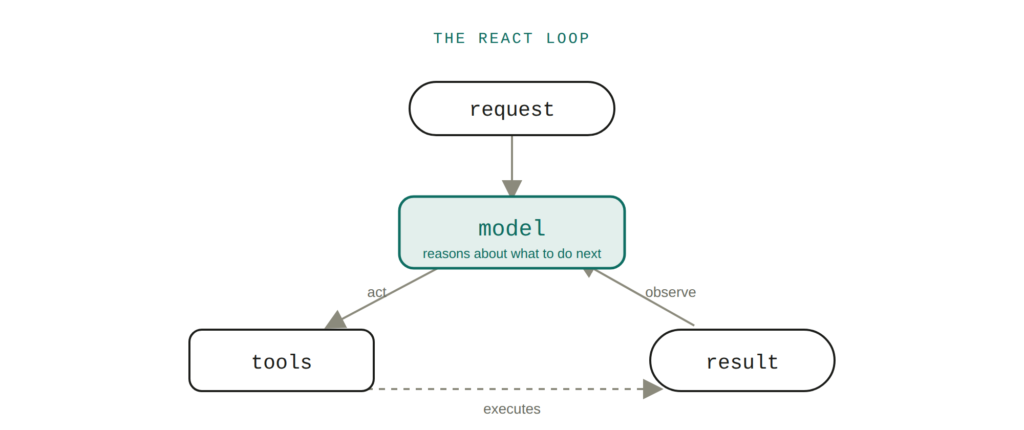
The loop underneath almost everything called an "AI agent" today.
This has a name in the research world: ReAct, short for Reasoning and Acting. The idea has been around since 2022, and it's still the backbone of most things people call "agentic" today, whatever new name gets slapped on it. Every time you see an AI tool that seems to "figure things out" rather than just respond, there's a good chance this loop is running underneath.
Here's a concrete example I like using with students.
Set up an agent with access to a small business database and exactly one tool: run a SQL query. Don't tell it what tables exist. Ask it, "which table has the most rows?"
It has to work this out itself. First it looks at what tables are available. Then it checks a few likely candidates. Then it answers. Nobody wrote a script that says "step 1, list tables, step 2, count rows." The model reasoned its way there, one tool call at a time, because that's what the loop is built to do.
This is the part worth sitting with before anything else. An agent isn't a bigger, smarter model. It's a normal model, put inside a loop that lets it act and observe and act again. The intelligence you're seeing is mostly the loop, not the model alone.
Agents forget everything, on purpose
Here's something that catches almost everyone off guard the first time they build something real: the model has no memory of its own. None. Every single time it "thinks," you are handing it the entire conversation from scratch, as a list of messages.
There are four kinds of messages doing the work here. A system message sets the instructions, the personality, the rules the agent has to follow. A human message is whatever the user typed. An AI message is what the model said or decided to do, including any tool it chose to call. A tool message is whatever that tool handed back.
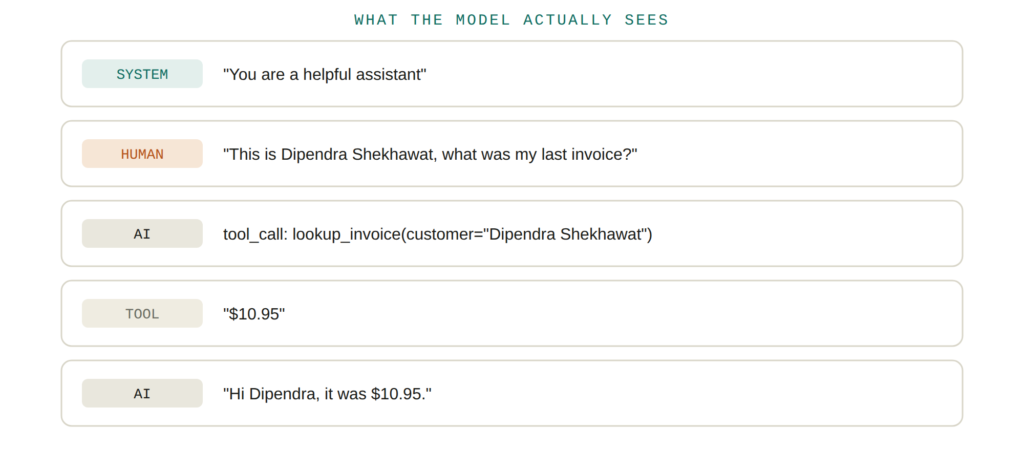
What the model actually receives isn't a conversation. It's a list like this, rebuilt from scratch on every turn.
Picture someone asking an agent to check an invoice. The human message asks the question. The AI message decides to call a lookup tool. The tool message comes back with a number. A second AI message reads that number and answers the customer.
Now imagine the same agent gets a completely unrelated follow-up a moment later: "what did I buy?" If the system running the agent didn't preserve that message history, and didn't know who was asking, the agent has nothing to go on. It might ask "who is this?" in the middle of what feels, to the human, like an ongoing conversation.
This is the unglamorous part of building an agent that nobody puts in a demo video. Prompting gets all the attention. Message handling is what actually determines whether your agent feels coherent or feels like it has short-term amnesia.
Tools are just functions with very good descriptions
The "acting" half of the loop happens through tools: functions the agent can call to actually do something, rather than just talk about it. A tool can be as plain as a function that multiplies two numbers and returns the result.
The detail that trips people up: the model never reads your code. It only ever sees the tool's name, its description, and the arguments it takes. That's the entire interface.
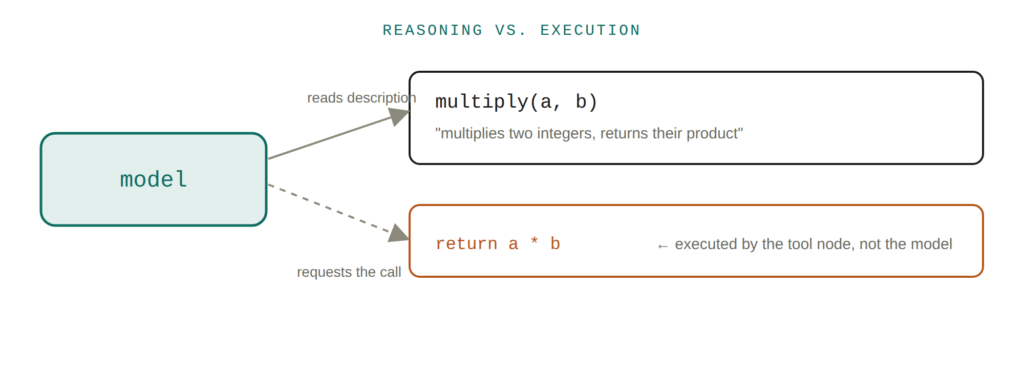
Two separate jobs: the model decides to call a tool, a completely different piece of code actually runs it.
If the description is vague, "does something with numbers," the model will guess badly about when and how to use it. If the description is precise, "multiplies two integers, a and b, and returns their product," it gets called correctly almost every time.
There are also two separate jobs happening, and it helps to keep them apart in your head. A reasoning step decides whether a tool is needed and what to pass it. A completely separate execution step actually runs the function and returns the result back into the loop. The model requests the action. Your code performs it.
If you ever find an agent behaving unpredictably, calling the wrong tool, or not calling a tool it clearly should, the fix is rarely a smarter model. It's almost always in how the tool was described. Read your tool descriptions the way a stranger would read them, with none of the context you have in your head, and the bug usually jumps out.
You don't have to build the same tool twice
Once you're managing more than a couple of tools, or more than one agent, a different problem shows up: duplication. Every agent that needs to check a calendar, or query a customer record, or search an inbox, ends up with its own copy of that same tool, written slightly differently, with slightly different bugs.
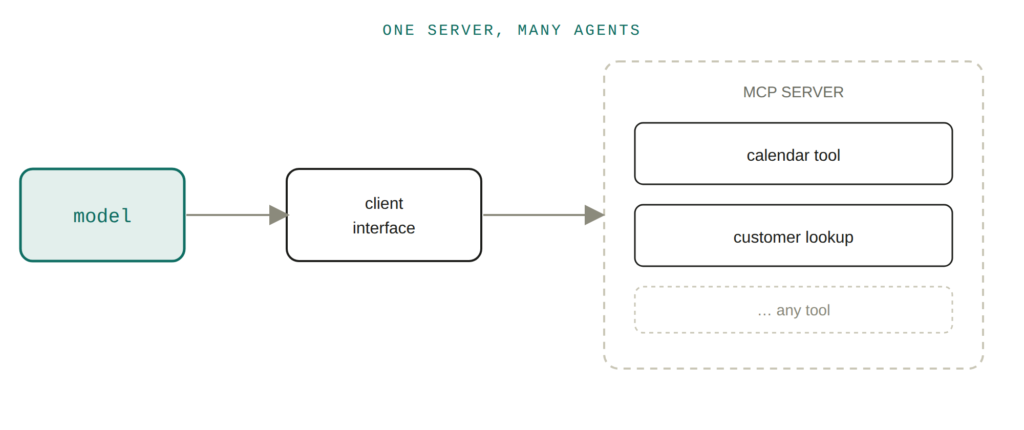
Build the tool once, on a server. Every agent that speaks the protocol can use it.
This is the problem MCP, short for Model Context Protocol, is built to solve. Instead of a tool living directly inside your agent's code, it lives on a separate server. Your agent talks to a client interface, the client talks to the server, and the server hands back whatever tools it exposes: a calendar, a database connection, a CRM lookup, anything.
Build the tool once, as an MCP server, and any agent that speaks the protocol can use it without anyone rewriting it. For a consultancy building agents for multiple clients, or a business running several agents across different parts of the operation, this is the difference between maintaining fifteen slightly different versions of the same integration and maintaining one.
Memory and context solve two different problems
People frequently confuse two separate questions: "why doesn't my agent remember the customer it just spoke to," and "how do I give my agent a database connection without hardcoding it into every tool."
These need different fixes, and mixing them up wastes a lot of debugging time.
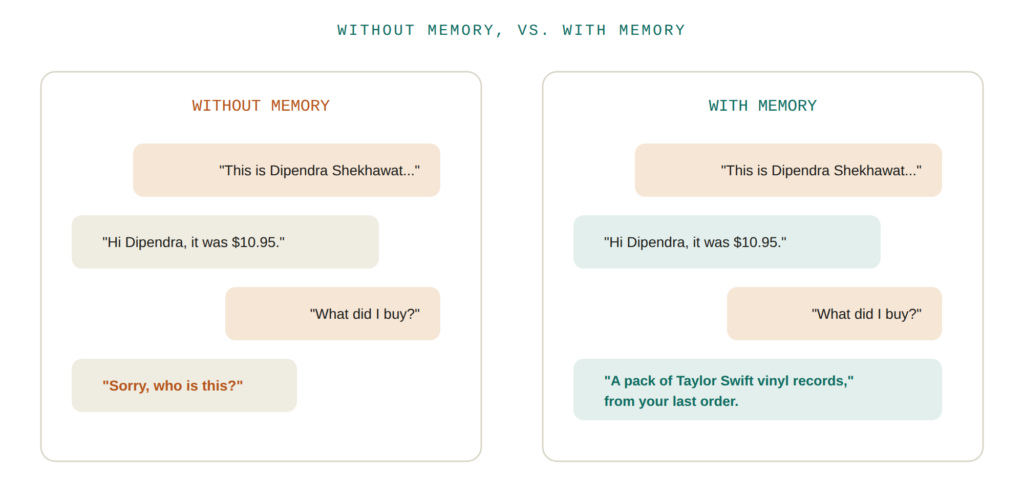
Same follow-up question. The only difference is whether the earlier turn was preserved.
Memory is what lets an agent recall past interactions. Tell it "this is Dipendra Shekhawat, what was my last invoice," and it can answer "$10.95." Come back later and ask an unrelated question with no name attached, and an agent with memory still knows who it's talking to. Without it, that context is gone the moment the conversation ends.
Runtime context is a different animal entirely. It's the static information an agent needs to operate that has nothing to do with conversation history: a specific database connection, a user ID, a set of credentials for that particular run. You pass it in once when you start the agent, and any tool that needs it can reach in and use it, rather than someone hardcoding a connection string into every tool by hand.
If your agent seems forgetful, that's usually a memory problem. If your agent seems to need the same configuration re-entered every time, or breaks the moment you point it at a different client's data, that's usually a context problem. They look similar from the outside. They are not the same fix.
The safeguard that separates a demo from something you'd actually run
There's a specific kind of dangerous sentence people say about automation: "and then it just runs." No pause, no check, no human anywhere in the loop. For anything touching real business operations, that's the wrong default.
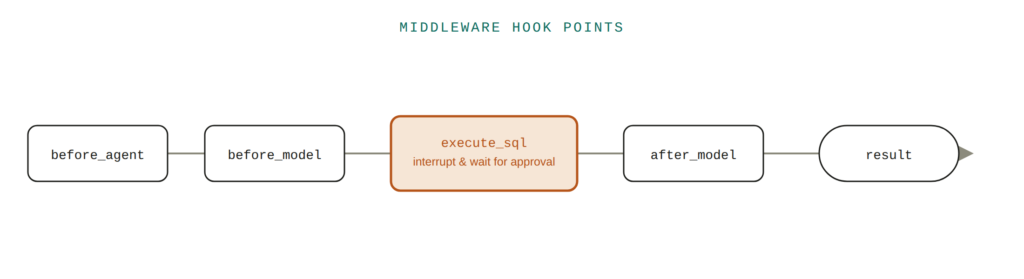
Middleware lets you drop code into any of these points. Human-in-the-loop uses that same mechanism to force a pause.
This is where middleware and human-in-the-loop controls come in. Middleware lets you insert your own logic at specific points in the agent's loop: before it starts, before or after it calls the model, before or after it calls a tool, or after the whole run finishes. Setup, logging, retries, guardrails and approvals all slot into one of these points.
Human-in-the-loop is the most important of these for anyone putting an agent into production. You pick the exact moment that matters, in the SQL example, that's any time the agent wants to actually run a query against the database, and you tell the system to pause there and wait for a person to approve it before continuing.
It's a small change in the code. It's the entire difference between "the agent drafted a query and someone checked it before it ran" and "the agent ran a query against a live system at two in the morning with nobody watching."
Why this matters if you're not the one writing the code
None of this requires you to become an engineer. But if you're the one deciding whether to bring an agent into your business, or the one training a team to build one, understanding this loop changes the questions you ask.
Not "does it use AI," but "what's the loop doing when I'm not looking, what does it remember between requests, and where's the pause button if it's about to do something it shouldn't."
That's usually where the real conversation about automation should start. Everything else is implementation detail.